Mobile & Native Systems Project
Screeenc USB-Only Screen Sharing
Client
Personal project
Timeline
3 Months
Role
System Architect and Android Developer
Year
2026
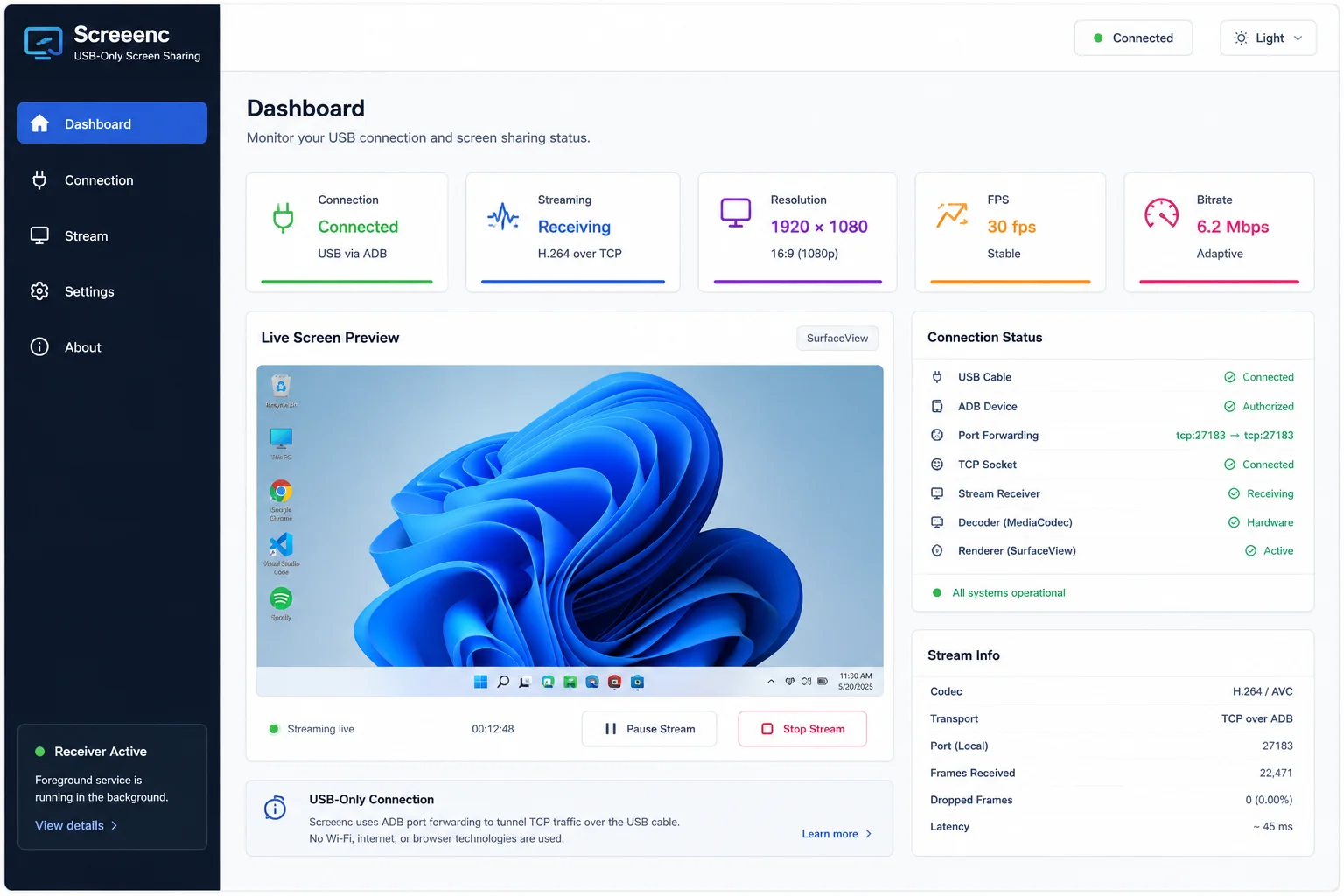
A USB-only screen sharing solution that streams a Windows desktop to Android with low latency and no Wi-Fi, internet, or browser technologies.
Mobile / Flutter / Kotlin / MediaCodec / H.264 / TCP Sockets / ADB / DXGI
Screeenc is a screen sharing system designed to stream a live Windows desktop screen to an Android device using only a USB cable. The project avoids Wi-Fi, internet-based transport, and browser technologies, instead relying on officially supported APIs and USB tunneling through ADB port forwarding. The Android receiver is fully implemented with hardware-accelerated H.264 decoding, foreground service support, USB connection detection, and a Flutter-based status interface, while the Windows sender is planned to handle screen capture and encoding through native Windows APIs.
The Challenge
Delivering responsive screen mirroring over a USB-only connection requires a complete native media pipeline: desktop capture, low-latency H.264 encoding, framed TCP transport, ADB tunneling, hardware decoding, Android background behavior, and reliable rendering. The system also needed to stay entirely in user mode and avoid unsupported hooks, DRM bypasses, kernel drivers, or internet-based transport.
The Impact
The implemented Android receiver proves the core USB transport and native decoding architecture while providing a clean Flutter status experience. The design establishes a compliant path toward a complete Windows-to-Android screen sharing system using supported platform APIs and hardware acceleration.
Receiver Dashboard
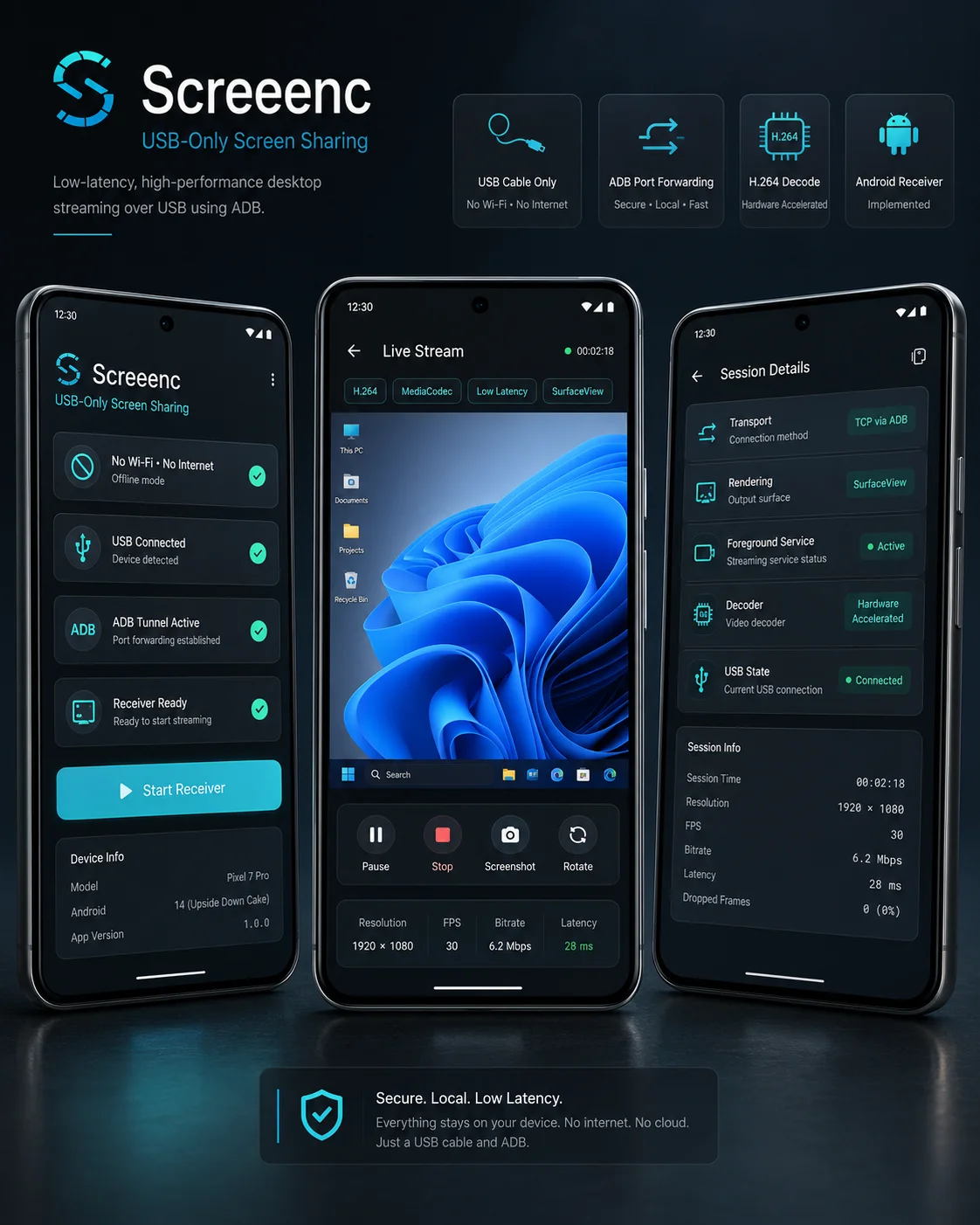
Mobile Receiver
- 01
Designed the full end-to-end architecture for streaming Windows screen content to Android over USB.
- 02
Built the Android receiver application using Flutter and Kotlin with platform channel integration.
- 03
Implemented TCP-based H.264 video receiving and hardware-accelerated decoding with MediaCodec.
- 04
Added foreground service behavior, persistent notification handling, and automatic USB connection-state detection.
- 05
Structured the project around officially supported APIs and user-mode-only techniques without security bypasses.
- 06
Prepared the architecture for native Windows sender development using DXGI Desktop Duplication and Media Foundation.
Android Receiver
- Hardware H.264 Decoding: Use MediaCodec for efficient hardware-accelerated video processing.
- USB Tunnel Streaming: Receive TCP video data forwarded through ADB over a physical USB cable.
- Foreground Service: Keep the receiver active through notification-based Android background behavior.
- USB Detection: Reflect connection availability automatically as the attached USB state changes.
- Flutter Status UI: Display live receiver and connection state through a focused mobile interface.
- Native Rendering: Present decoded frames through SurfaceView for efficient playback.
Project Type
Solo native systems and mobile project
My Role
System architect and Android receiver developer
Current Status
Android receiver implemented; native Windows sender planned
Connection
USB cable through ADB port forwarding
Network Requirement
No Wi-Fi or internet connection required
Mobile UI
Flutter and Material 3 — Connection status, receiver controls, and clean Android user experience
Native Android
Kotlin — Platform channels, foreground service, USB state, and native media integration
Decoder
Android MediaCodec — Hardware-accelerated H.264/AVC video decoding
Rendering
SurfaceView — Efficient display of decoded video frames on Android
Transport
TCP sockets — Stream encoded video data through a reliable local byte connection
USB Tunnel
ADB port forwarding — Forward localhost TCP traffic between Windows and Android through USB
Windows Capture
DXGI Desktop Duplication — Planned native desktop frame capture through supported Windows APIs
Windows Encoding
Windows Media Foundation — Planned hardware-assisted H.264 encoding on the sender
Sender Languages
C++ or C# — Planned native Windows capture, encoding, and transport implementation
End-to-End System Architecture
- The planned Windows sender captures desktop frames through the DXGI Desktop Duplication API.
- Windows Media Foundation encodes captured frames as a low-latency H.264/AVC stream.
- The sender publishes encoded data through a TCP socket bound to localhost.
- ADB port forwarding tunnels the localhost connection through the USB cable to Android.
- The Kotlin receiver reads the H.264 stream, supplies encoded data to MediaCodec, and renders decoded output through SurfaceView.
- Flutter communicates with the native Android layer through platform channels and presents receiver status to the user.
Native Android Media Pipeline
- Kotlin owns the performance-sensitive socket, decoding, service, and rendering workflows.
- MediaCodec uses device hardware where available to reduce CPU usage and decoding latency.
- SurfaceView gives the decoder a native rendering surface instead of routing video frames through Flutter widgets.
- Foreground service behavior helps Android keep the receiver active during an ongoing screen sharing session.
- Notification state makes the background receiver visible and controllable under Android platform requirements.
USB Transport Design
- The platform uses a direct USB cable rather than Wi-Fi discovery or internet relay services.
- ADB port forwarding maps host and device TCP ports without requiring a custom USB kernel driver.
- TCP provides ordered, reliable delivery for the encoded H.264 byte stream.
- Local-only transport reduces infrastructure requirements and keeps screen data away from external networks.
- Connection-state detection informs the mobile interface when the expected USB pathway becomes available or unavailable.
Planned Windows Sender
- C++ or C# will provide native access to Windows screen capture, media encoding, and socket APIs.
- DXGI Desktop Duplication is planned for officially supported high-performance desktop capture.
- Windows Media Foundation is planned for H.264 encoding with hardware acceleration where supported.
- The sender will frame encoded output for TCP delivery and maintain the local connection forwarded by ADB.
- The sender remains a native desktop component rather than a web or browser-based screen capture tool.
Security & Compliance
- Uses officially supported Microsoft and Android APIs only.
- Runs entirely in user mode without kernel drivers, system hooks, or privileged capture modifications.
- Does not bypass DRM or attempt to capture protected secure surfaces.
- Keeps transport USB-only with no dependency on Wi-Fi, internet services, or web communication.
- ADB forwarding is used as a supported developer transport mechanism rather than a security bypass.
Current Delivery Status
- The Android receiver, native decoding pipeline, foreground service behavior, USB state handling, and Flutter status interface are implemented.
- The project architecture and transport strategy are defined end to end.
- The Windows capture and encoding sender remains the next planned implementation phase.
- The current receiver work validates the core mobile and USB-tunnel direction before sender completion.